KST Moschkau GmbH, Am Burgholz 36, 52372 Kreuzau, Germany

KSTacademy

The media industry is moving faster than ever before. Whether it’s social media Reels, professional podcasts or AI-powered workflows – anyone creating content today needs tools that make their work easier, rather than more difficult. At KSTacademy, we’ll equip you to meet precisely these challenges.

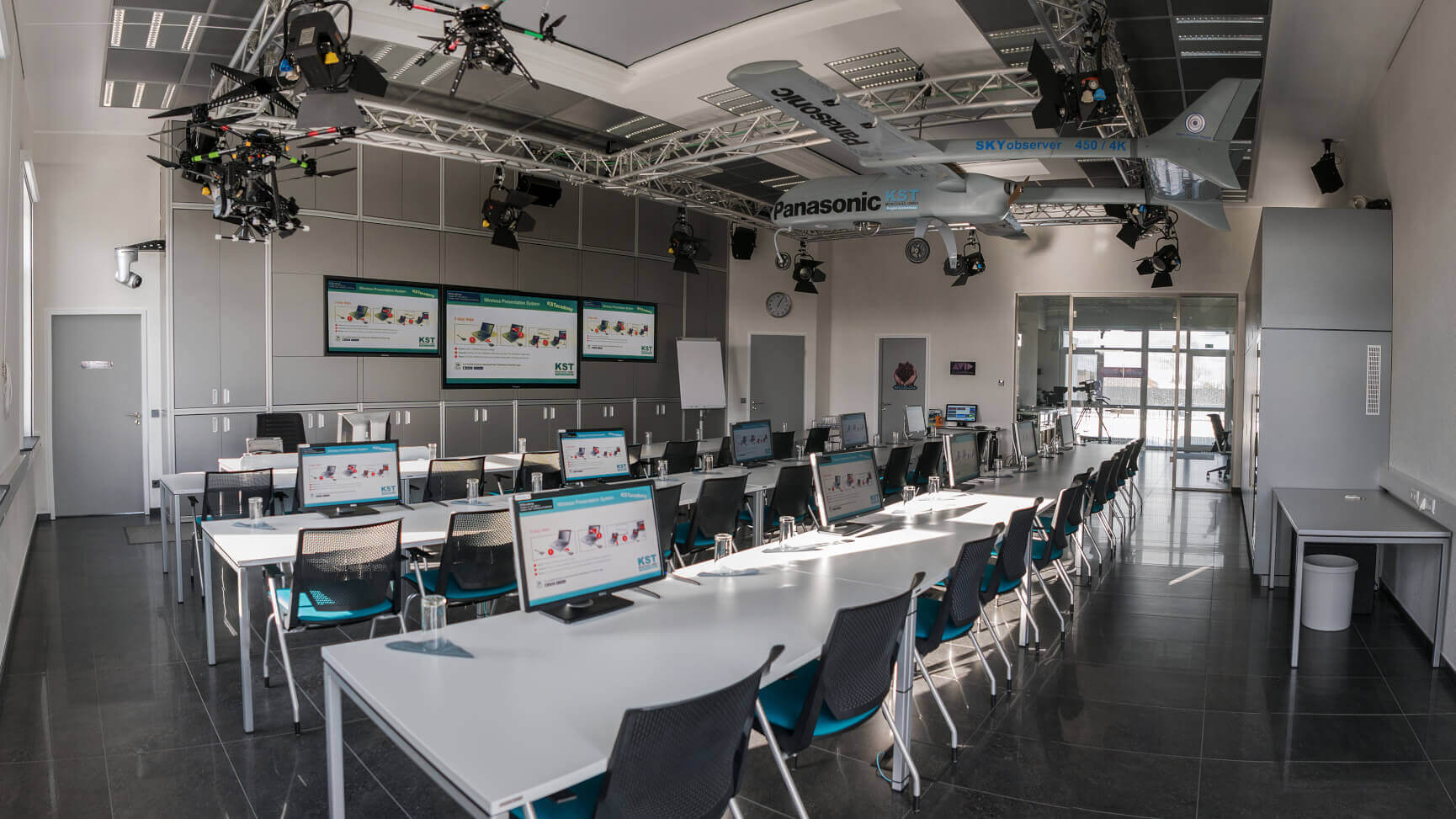
High-end technology meets real-world workflows: we don’t just show you the software; we show you the ‘big picture’. Our training room is a fully networked production environment: from traditional on-premises workflows to modern cloud editing, we can demonstrate and recreate everything live during the training. This way, you’ll learn how structure and technological innovation give you the freedom to be creative.

Flexible learning, relaxed travel: your time is precious. That’s why we offer many of our training courses as condensed 3-day intensive courses. By slightly extending the training days on site, we ensure that the full curriculum is covered, whilst at the same time allowing you to arrive in a relaxed manner on Monday and depart stress-free on Friday.

Your competitive edge through expertise: from DaVinci Resolve and Fusion to Affinity, Unreal Engine and Blender – our training courses are always at the cutting edge. We adhere strictly to current industry standards and tailor the content perfectly to the realities of day-to-day production.

Certified and verified by the manufacturers: for us, quality is not just an empty promise: we are an official Avid Learning Partner and Blackmagic Design Training Partner. This means that not only are our trainers experts, but our entire training centre has been verified, audited and certified directly by the manufacturers. Whether you’re just starting out or a seasoned professional: we’ll take your projects to the next level in a verified professional environment.

KSTacademy Training Overview

KAIROS - Basics

Master the next generation of video mixing! In this specialised training course, you’ll get to know the Panasonic KAIROS IT/IP platform from the ground up, regardless of the configuration – whether as a standalone unit or as part of a network. We’ll demonstrate the latest features of the current software version. As well as covering the basic operation of the system, we’ll delve deep into ST2110 signal processing and show you the seamless integration between KAIROS, CamBot® and Zero Density Reality in a modern studio environment.

An overview of the course content:

  • System Setup & IP Infrastructure: Gain a thorough overview of the system architecture and the configuration of inputs and outputs in the ST2110 network.
  • Scene Management & Layering: Learn how to create complex scenes, apply transitions, and use still image libraries, clip players, RAM players and audio players, as well as canvas options (aspect ratios 16:9, 9:16 or 32:9)
  • Advanced Operations: Unlock the full potential of the panel with Smart Delegation, PTZ control and custom profiles for efficient live operation.
  • Automation & Workflow: Find out how you can create automated and dynamic productions using macros and integration with KST CamBot® and Zero Density Reality.

This course is ideal for you if you want to make the most of the possibilities offered by an IT-based platform and master the technical complexities of IP studios with confidence.

2-day training course

Participants: max. 3 places

2.400 € excl. taxes

Affinity Studio - Intensive training

All the layout, design and image editing tools you need – now in a single app. Free of charge. No more switching between programmes! The new Affinity Studio brings together image editing, vector design and layout in a single app for the first time. In this 5-day intensive course, you’ll learn how to use this seamless workflow for your projects.

Your upgrade for design and efficiency:

  • A workflow: Switch in a flash between photo retouching, vector graphics and layout – all within a single document, without leaving the app.
  • Maximum creativity: Master professional image editing, precise design and high-quality publishing with non-destructive professional tools.
  • An easy switch: Perfect for you if you want to get started from scratch or make a smooth transition from other software to Affinity.

Become an Affinity expert in just one week and design faster, smarter and more intuitively. This course is aimed at beginners or users who have already gained some experience with the ‘old’ Affinity apps.

5 day training

04.05. – 08.05.2026

max. 10 participants

1.490 € excl. taxes

DaVinci Resolve v20: Update & Workflow Training

Get the most out of your edit! In this 3-day training course, you’ll learn how to make the most of the new features in DaVinci Resolve v20 and seamlessly transition from older versions (17–19). We’ll take your post-production to the next level.

Your speed boost for the BW workflow:

  • Master the new features: Use the latest AI tools and automation features in Version 20 to overcome technical hurdles more quickly and free up more time for creativity.
  • Vernetztes Arbeiten & Cloud Workflows: Schluss mit isolierten Einzelplätzen. Wir zeigen Dir, wie Du den Resolve Project Server und zentralen Speicher optimal nutzt. Verstehe das Zusammenspiel aus Datenbank und Speicher, um Projekte reibungslos im Team zu teilen – egal ob lokal oder via Cloud.
  • A smooth transition: We’ll show you the key changes compared to previous versions, so you can get started straight away.

The update for experts: Upgrade your expertise to version 20 and, if you wish, obtain your official ‘Resolve Certified’
certificate.

5 day training

19.05. – 21.05.2026

max. 10 participants

1.490 € excl. taxes

DaVinci Resolve & Elements - Basic Training

Your foundation in video editing. Discover the perfect introduction to the world of DaVinci Resolve! In this 5-day intensive course, you’ll learn, step by step, how to professionally complete your projects from the initial footage right through to the final export. We’ll ensure you feel confident using the software and the latest workflows.

Your path to a finished project:

  • The full spectrum: Master the key areas of work – from quick editing and precise colour correction to professional audio editing and flawless export.
  • Cloud Workflow & Archiving: Use the Blackmagic Cloud for seamless project sharing and professional sign-offs via ‘Presentations’. We’ll also show you how to archive your data securely and in a structured way once a project is complete.
  • Pure hands-on experience: Through plenty of exercises, you’ll develop a solid grasp of the software and understand the logic behind DaVinci Resolve from the ground up.

This course is ideal for you if you’re just starting out or if you’re returning to the software and want to build a solid foundation using the latest version (v20). We’ll prepare you perfectly for the optional ‘Resolve Certified’ exam.

5 day training

08.06. – 12.06.2026

max. 10 participants

1.490 € excl. taxes

DaVinci Resolve – Editing Techniques and Effects

Leave theory behind and dive straight into the project! This 5-day advanced course focuses on practical work. Using a wide range of sample projects, you’ll practise complex workflows directly within the software to boost your confidence and speed in the editing suite.

Your practical guide to editing:

  • Editing training using real-world projects: Gain a deeper understanding of advanced techniques such as trim modes and multicam editing through practical examples.
  • Creativity through routine: Make extensive use of effects, image editing and sound design until every step is second nature and you’re making the right decisions intuitively.
  • Real-World Workflow: Discover how the Blackmagic Cloud can make your day-to-day editing more productive by actively integrating it into your project workflow.
  • Speed & Precision: Through intensive practice, you’ll increase your speed and master even the most challenging timelines with ease.

This is ideal for you if you already have some basic knowledge and now want to become a confident editing professional through plenty of practical practice.

5 day training

21.09. – 25.09.2026

max. 10 participants

1.490 € excl. taxes

DaVinci Resolve: Fusion, VFX & Motion Graphics v20

Immerse yourself in the world of visual effects and animation! In this introductory course, you’ll learn how to use the Fusion interface with confidence for your post-production work. We’ll guide you step by step through the node-based workflow so that you can efficiently create complex compositing tasks and high-quality motion graphics.

An overview of the course content:

  • Node-based workflow & VFX: Understand the logic behind Fusion and learn how to structure visual effects (VFX) and compositing tasks in a flexible and organised way.
  • 2D Animation & Motion Graphics: Create dynamic infographics, animated titles and visual highlights that enhance your content in a professional way.
  • Macros & Interactive Templates: Learn how to create your own generators and captions. By using macros, you can build tools and effects that you can then control intuitively on the Edit page.
  • Effects & Compositing: Combine different image sources and masks to create a cohesive final image and master the basics of professional look development.

This course is ideal for you if you want to understand the technical intricacies of Fusion and learn how to significantly speed up your workflow using your own macros and templates. Master the Node workflow in Fusion and learn how to create professional VFX effects and smart templates for your day-to-day work.

5 day training

13.07. – 17.07.2026

max. 10 participants

1.490 € excl. taxes

DaVinci Resolve & Fusion: 3D-Animation & Blender-Integration

Add a third dimension to your workflow! In this advanced course, you’ll learn how to make the most of Fusion’s 3D capabilities and integrate Blender into your pipeline as a powerful addition. We’ll show you how to create high-quality 3D animations and exchange complex scenes between the programmes without any loss of quality.

Expand your reality into the next dimension:

  • 3D Workspace in Fusion: Learn how to work with cameras, light sources and shaders directly within DaVinci Resolve’s 3D environment.
  • Blender for video producers: Learn the basics of 3D modelling and animation in Blender so you can create custom objects and environments for your films.
  • Pipeline & Data Exchange: Find out how to efficiently synchronise 3D data, render passes and camera tracking information between Blender and Fusion.
  • Advanced Compositing: Combine live-action footage with 3D elements to create a photorealistic final image, and use particle systems to create complex visual effects.

This course is ideal for you if you already have a solid grounding in Fusion and want to take your productions to the next level with professional 3D animations and the power of Blender. Learn how to create 3D animations with confidence and make the most of the synergies between Fusion and Blender in your day-to-day work.

5 day training

05.10. – 09.10.2026

max. 10 participants

1.490 € excl. taxes

Workshop: Finishing, Mastering and Archiving

The finishing touches for your production! This three-day training course is all about achieving the perfect finish. You’ll learn how to complete your projects to the highest technical standard using advanced techniques, how to recover video and audio, and how to back up your data professionally.

Put the finishing touches to your work with professional tools:

  • Advanced colour correction: Go beyond the basics. Use complex grading workflows to give your images a cinematic look or to perfectly balance challenging footage.
  • Audio Mastering & Finishing: Master advanced tools in Fairlight to create a powerful, clear and broadcast-ready audio master.
  • AI Power & Image Recovery: Use the latest AI tools for secure, automated pixelation and learn high-end methods for recovering problematic image material.
  • Profi-Export & Elements: Create flawless masters, clean feeds and B-roll footage.

This course is perfect for you if you want to confidently see your projects through to the final master whilst retaining full control over
quality and structure. Master advanced techniques in colour grading and audio mastering, and
learn how to work confidently with professional finishing workflows.

5 day training

16.06. – 18.06.2026

max. 10 participants

1.490 € excl. taxes

Workshop: Social Media with Strategy

Create content that sticks in people’s minds! In this 3-day training course, you’ll learn how modern platforms work and how to create videos that don’t get lost in the flood of information. We bridge the gap between strategic planning and creative execution right at the editing desk.

Your roadmap to successful content:

  • Strategy & Psychology: Understand how algorithms work and what really makes for successful video content. Build a solid foundation for your content strategy.
  • Theory & Practice on Set: Learn how to lay the groundwork for powerful Reels and Shorts whilst you’re filming – from image composition to the right format, Camera2Cloud workflows – straight from the camera to the editing system
  • Editing & Effects: Master fast, dynamic editing in DaVinci Resolve. Use effects and transitions strategically to keep your audience’s attention.
  • Animated captions: Learn how to create modern, animated captions, which are essential for success on social media today.

This course is ideal for you if you want to understand the key platforms and learn how to efficiently implement professional workflows for modern formats. Get to grips with the world of social media and learn how to produce impressive content using strategic know-how and creative editing.

5 day training

08.09. – 10.09.2026

max. 10 participants

1.490 € excl. taxes

Workshop: Audio Workflows for Podcasts and Video

Good sound makes all the difference! In this workshop, you’ll learn how to create professional-quality sound for podcasts, interviews and videos. We’ll guide you through the entire process – from the initial microphone recording right through to the final mastering – so that your content not only looks good, but sounds perfect too.

Your guide to achieving the perfect sound:

  • Recording & Acoustics: Choose the right microphone and master a range of recording situations – whether in a professional studio, on set or in a mobile podcast setup.
  • Editing & Sound Design: Learn how to edit audio content seamlessly, use music and sound effects effectively, and harness the psychology of listening to get your message across.
  • Mastering & Restoration: Use Fairlight in DaVinci Resolve to professionally remove background noise and give your audio a powerful, clear and broadcast-ready finish.
  • Export & Release: Find out how to optimise your audio projects for different platforms and what’s important when mastering for various devices.

This course is ideal for you if you want to gain full control over your audio productions and create high-quality formats
such as podcasts or interviews to a professional standard.

3 day training

30.06. – 02.07.2026

max. 10 participants

1.490 € excl. taxes

Workshop: Media Production 3.0

Discover the future and the new possibilities in content creation! In this practical training course, you’ll learn how modern technologies are fundamentally transforming video production. We’ll show you how to make targeted use of real-time graphics and artificial intelligence to explore completely new approaches to production, from the initial idea right through to the finished clip.

The tools of tomorrow:

  • Unreal Engine & Virtual Sets: Learn the basics of Unreal Engine and discover how virtual sets and real-time environments can revolutionise your shoots. Understand how real-time workflows speed up traditional production and open up entirely new creative possibilities on set and in the edit suite.
  • Immersion & Reality: Expand your toolkit to include 360° video and photogrammetry, so you can digitally capture real-world objects or entire environments and integrate them into your projects.
  • Generative AI in action: Use AI tools specifically as creative assistants – from automated asset creation to workflow optimisation in post-production.
  • AI-powered film production: Turn an idea into a complete visual. Use a range of generative AI tools to bring your own short film projects to life, from the initial image generation right through to the finished film.

This course is perfect for you if you want not only to understand modern tools such as AI and Unreal Engine in theory, but also to use them as practical tools in your daily workflow to produce content more quickly and creatively.

3 day training

17.11. – 19.11.2026

max. 10 participants

1.490 € excl. taxes

Contact

Burkhard Schmitz
Trainer Broadcast & ProAV

Important information about your participation

To help you plan your stay with us as effectively as possible, we have summarised the most important organisational details for you here:

Training times & schedule:
• 5-day courses: We start on Mondays at 12:00 and finish the course on Fridays at around 12:00.
• 3-day courses: These courses start on Tuesdays at 08:30 and finish on Thursdays at around 18:00

All-inclusive catering:
We’ve got your meals covered: lunch, as well as coffee and soft drinks, are included in your course fees for the entire duration of the training.

Registration & Places:
You can easily register for your chosen course using our interactive KST registration form. As we place great importance on providing intensive support, the number of participants per course is limited to a maximum of 10. We recommend booking early to ensure you secure a place.

Accommodation:
Recommended hotel in the immediate vicinity of the KSTacademy: www.hotel-burgholz.de